Buffer's price in India is its US dollar price: free for 3 channels, then Essentials from $6 and Team from $12 per channel a month, less on yearly billing. RapDesk Reels is a yearly key, ₹3,800 per computer plus GST. They do different jobs, so the cheaper one depends on what you need.
| If you mainly need to… | Pick | Why, in one line |
|---|---|---|
| Schedule posts to Instagram plus LinkedIn, YouTube, Pinterest or others | Buffer | It publishes to 12 networks from one queue; Reels is Instagram only |
| Have a manager approve posts before they go out | Buffer (Team) | Approval workflows are a Team plan feature; Reels has none |
| Find people on Instagram and follow up by message | RapDesk Reels | Audiences, DM sequences and an inbox are its core; Buffer's page lists none of that |
| Run many Instagram accounts from one desk on a fixed budget | RapDesk Reels | One key per computer, as many accounts as you connect |
| Post while every computer in the office is switched off | Buffer | Reels runs only while your computer and the app are on |
| Pay in rupees with a GST invoice | RapDesk Reels | Priced in ₹ with GST on the invoice; Buffer's page shows only $ |
What does Buffer cost in India today?
Buffer does not show rupees. Its pricing page shows dollar prices only, and its own FAQ says it takes cards (Visa, Mastercard, American Express, JCB, Discover and Diners Club), not PayPal or bank transfer. We have not converted the figures, because your card issuer's rate and fees decide the rupee amount on your statement.
Here is what buffer.com/pricing showed on 23 November 2026:
| Buffer plan | Monthly billing | Yearly billing | Users | What stands out |
|---|---|---|---|---|
| Free | $0 | $0 | 1 | Up to 3 channels, 10 scheduled posts per channel at a time |
| Essentials | $6 per channel a month | $5 per channel a month ($60 a year for 1 channel) | 1 | Unlimited scheduled posts, first comment scheduling, hashtag manager |
| Team | $12 per channel a month | $10 per channel a month ($120 a year for 1 channel) | Unlimited | Everything in Essentials plus approval workflows and access levels |
A channel is one social account. Five brands with an Instagram and a Facebook page each make 10 channels. Above 10 channels the per-channel rate falls: Buffer's own example puts 25 Essentials channels at $120 a month, or $100 a month billed yearly.
Paid plans start with a 14-day free trial. "Unlimited" posts carry a fair-use cap of 5,000 posts per channel, per Buffer's FAQ.
Indian tax is not addressed on the page. Its tax answer covers VAT for customers in the United Kingdom. Ask your CA how a foreign software subscription paid by card fits your GST returns before you rely on it for input credit.
What does RapDesk Reels cost?
These are the live rows from our pricing page on 23 November 2026, per computer, before 18% GST:
| Term | 1 or 2 computers | 3 to 5 computers | 6 or more |
|---|---|---|---|
| 1 year | ₹3,800 | ₹3,399 | ₹2,999 |
| 2 years | ₹6,399 | ₹5,799 | ₹5,099 |
| 3 years | ₹8,499 | ₹7,599 | ₹6,799 |
One computer for one year comes to ₹4,484 with GST. The price does not change with the number of Instagram accounts you connect, which is the real gap between the two pricing models. Buffer counts accounts. We count computers.
There is no free trial. The download is free and installs without paying, and the key is what runs it. Nothing renews by itself, and all sales are final. Reels is also part of the Social pack with RapDesk Social and RapDesk Network, at ₹9,099 a year for one computer.
Book a free live demo and we will run Reels on a test account for you before you spend anything.
Is RapDesk Reels a Buffer alternative at all?
Partly. Treat it as an Instagram follow-up tool that also has a calendar, not as a scheduler.
Buffer is built around a publishing queue across 12 networks: Instagram, Facebook, LinkedIn, X, Threads, TikTok, YouTube, Pinterest, Google Business Profile, Bluesky, Mastodon and Substack. On top of that sit ideas, analytics, a comment inbox and an AI assistant.
RapDesk Reels starts at the other end. You build an audience from the followers of a public account, people who liked or commented on a post, a hashtag, a location, a search or a CSV. Then you run actions on them: messages, follows, likes, comments and story views, as one action or as a sequence over days. Replies land in one inbox with a small CRM.
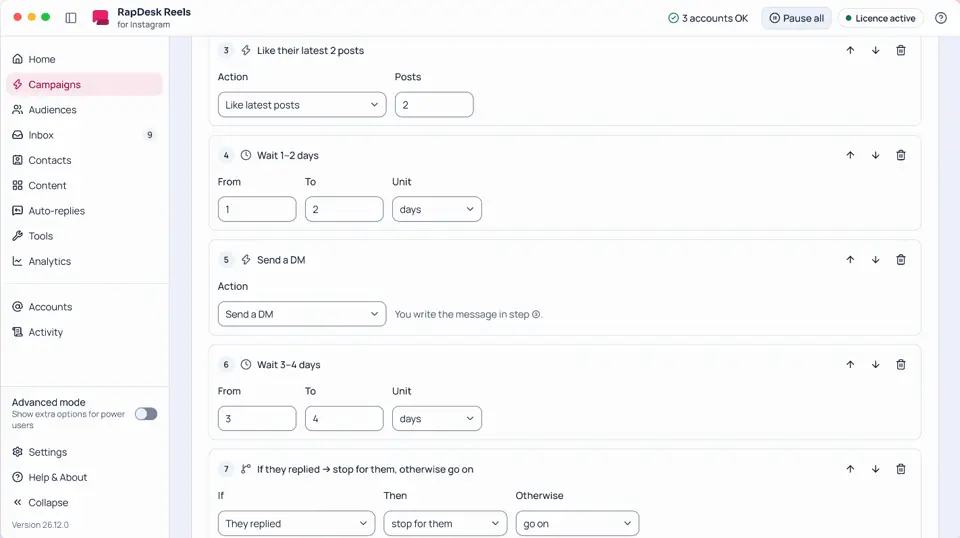
That sequence is the thing Buffer's pricing page does not offer at any price. A yoga studio in Pune that wants to invite people who commented "price" on its last post, then follow up two days later, needs Reels. A café chain that wants the same photo on Instagram, Facebook and Google Business Profile every Friday needs Buffer.
How do the two compare on Instagram posting?
| Topic | RapDesk Reels | Buffer (from its pricing page) |
|---|---|---|
| Where it runs | Your own Windows or macOS computer, through instagram.com in a browser | Automatic publishing listed for Instagram business and creator accounts |
| Instagram personal profiles | You log in to your own accounts yourself | Reminder notifications only, no automatic publishing |
| Posts, carousels | Yes, from a media library and composer | Yes |
| Reels and stories | Where Instagram's web offers them | Not named on the pricing page |
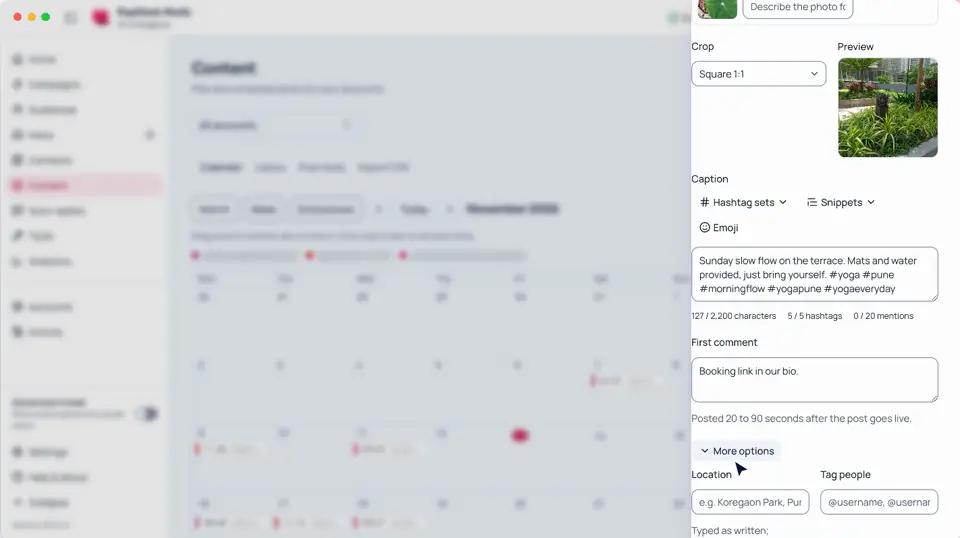
| First comment | Yes, posted 20 to 90 seconds after the post goes live | Essentials and Team, not Free |
| Hashtag sets | Yes | Hashtag manager on Essentials and Team |
| Calendar | Yes, across accounts, drag to reschedule, CSV bulk import | Visual content calendar on all plans |
| Other networks | No, Instagram only | 12 networks |
| Approvals | No | Team plan |
| Late posts | A post more than 2 hours late is never published on its own; you choose Publish now or Reschedule | Not stated |
Where is Buffer clearly the better pick?
We would point you to Buffer in three cases, and we mean it.
First, you publish to more than Instagram. If LinkedIn, YouTube Shorts or Google Business Profile matter as much as Instagram, one queue for all of them saves real time, and Reels cannot do that.
Second, your posts need sign-off. An agency whose clients approve every caption gets that on Buffer's Team plan. Reels has no approval step.
Third, nobody can keep a computer on. RapDesk Reels works through your browser, so it runs while the computer and the app are on. Closing the window keeps it working from the tray, but a sleeping or switched-off computer does nothing until you open it again.
Buffer's free plan is also a fair way to start if you post to three accounts or fewer and schedule a handful of posts ahead.
Where does RapDesk Reels earn its place?
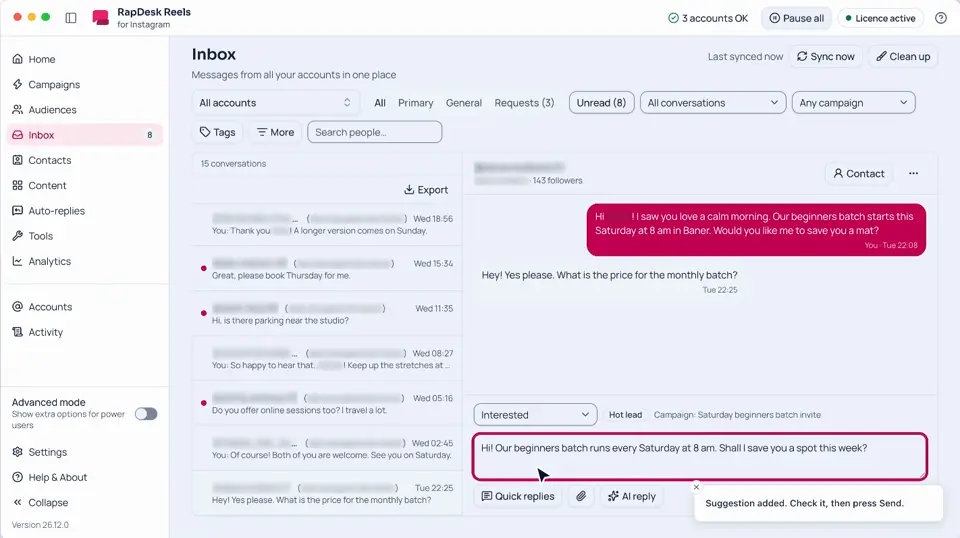
Conversations. Buffer's community inbox handles comments on your posts. Reels handles direct messages across all your accounts in one inbox, with quick replies, an AI reply suggestion using your own AI key, and a status on each person such as Interested.
It also has eight auto-replies, among them a welcome message for new followers, keyword replies in DMs and comment-to-message. Each one is off until you switch it on. For a coaching institute that posts its fee structure and gets fifty "price?" comments, comment-to-message replies to each person once, at a human pace.
Then there is cost at scale. An agency with 10 Instagram client accounts pays Buffer $50 a month on Essentials billed yearly, which is $600 a year, before any other network. One Reels key on one computer is ₹3,800 plus GST for the year, whatever the number of accounts you connect.
Be clear on what Reels is. It is an unofficial assistant for Instagram, not affiliated with Instagram or Meta. You log in to each account yourself, and every action is done in the page as a person would. Default limits for follows, messages and story views are shown on screen. For a first test, our user guide says to keep the audience to 50 to 200 people.
So which one should you buy?
Pick Buffer if you post to several networks, need approvals, or want publishing that does not depend on an office computer being on. Expect a dollar card charge that grows with every account you add.
Pick RapDesk Reels if Instagram is where your customers are, and the job is finding them and following up by message, with posting planned alongside. Expect a fixed yearly rupee price per computer and a GST invoice.
Some businesses run both: Buffer for the posting queue, Reels for the inbox and follow-ups. That split works well when one person posts and another handles replies. If you are also weighing Later, read our RapDesk Reels vs Later comparison. For the other tools we have lined up against named competitors, see all RapDesk comparisons, or read the full RapDesk Reels feature list.
Download RapDesk Reels for Windows or macOS and open it before you buy a key. The pricing page has every term and computer count.
FAQ
Is Buffer free in India? Buffer's free plan is open to anyone: 3 channels, 1 user and 10 scheduled posts per channel at a time. Paid plans are charged in US dollars.
Does RapDesk Reels charge per Instagram account? No. The key is per computer. You can connect as many Instagram accounts as you like, each in its own browser profile.
Does the computer need to stay on for RapDesk Reels? Yes. It runs while the computer and the app are on, and campaigns continue when you open it again.
Can RapDesk Reels post to Facebook or LinkedIn? No. RapDesk Social covers Facebook and RapDesk Network covers LinkedIn, each with its own key, or together in the Social pack.
Are the auto-replies on by default? No. All eight are off until you switch them on, one by one.
Sources
- Buffer plans, per-channel prices, volume tiers, trial, fair-use cap, payment methods, VAT note, channel feature table: buffer.com/pricing and its machine-readable copy buffer.com/pricing.md, checked 23 Nov 2026
- RapDesk Reels prices: rapdesk.com/pricing, live catalogue read 23 Nov 2026
- RapDesk Reels features: rapdesk.com/reels and the RapDesk Reels user guide (in-app Help)
Reviewed by Punit Chaudhary, 25 Nov 2026.
How this was made: drafted with AI tools, checked against our product and pricing on 23 Nov 2026, and edited by the RapDesk team.